
When I recommend software to clients — whether it’s a CMS, a CRM, an email platform, or an ecommerce tool, I almost always push them toward open source options. This article is my attempt to explain in plain terms what open source means, and to make the case for why it should matter to you, particularly in regards to your website.
What “Open Source” Actually Means
Open source software is software whose source code is publicly available. Anyone can view it, modify it, and distribute it. This doesn’t mean it’s always free (though it often is), but it does mean that you’re not locked into one company’s decisions about what the software does, what it costs, or how long it stays available.
Closed source (or proprietary) software is the opposite. The company that built it controls everything: the code, the features, the pricing, and the hosting. You’re renting access to someone else’s system, and the terms of that rental can change whenever they decide.
Here’s the simplest way to think about it: open source software is something you own and control. Closed source software is something you’re allowed to use, for now, under someone else’s terms.
Why This Matters: Pricing
The risk with closed source platforms isn’t that they’re expensive today, it’s that they can become expensive tomorrow, and there’s nothing you can do about it.
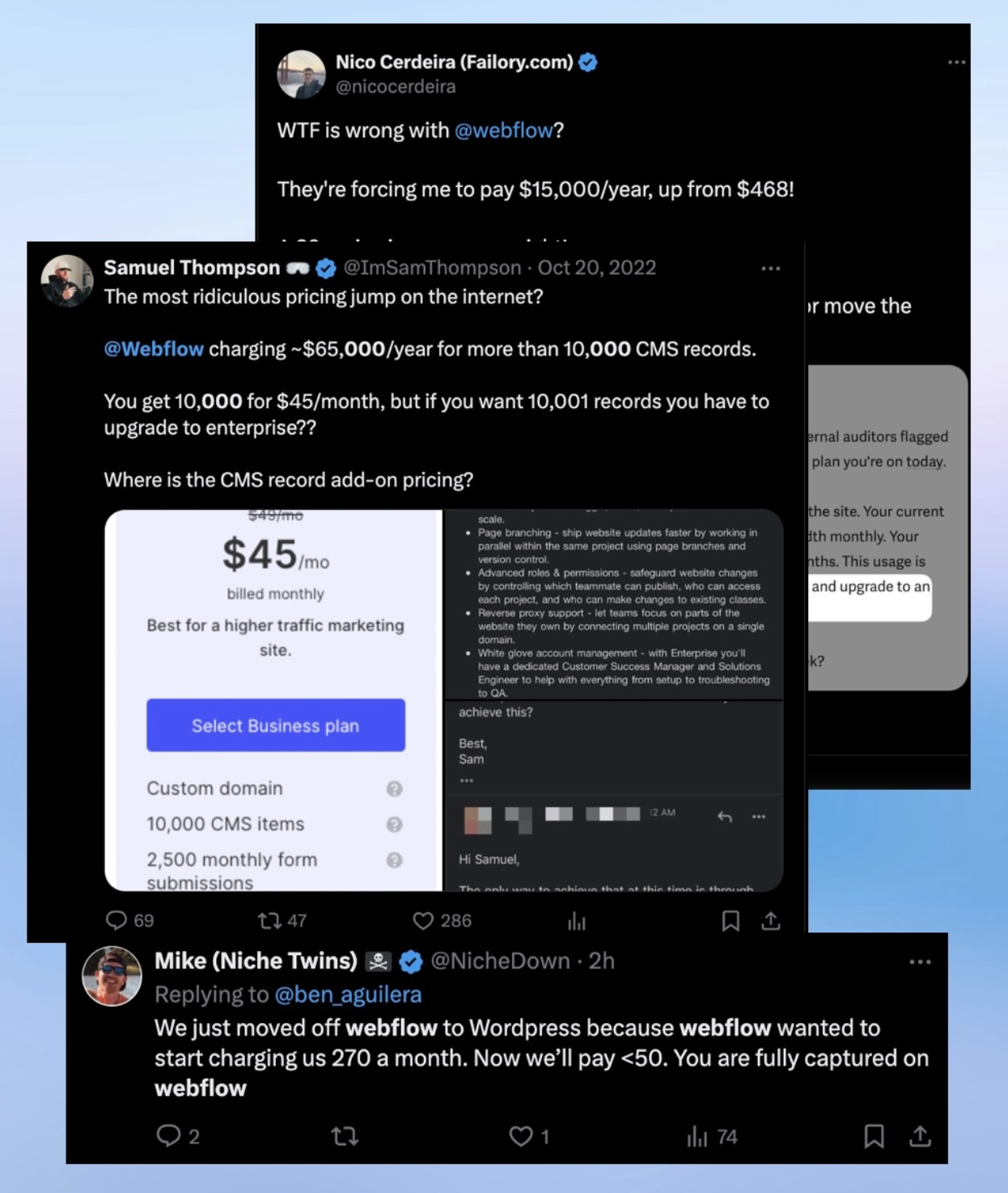
Webflow is a popular website builder, and it’s a good example of this dynamic. Their pricing has gotten increasingly complex and expensive over the past couple of years. What used to be a straightforward “pick a plan and build” setup has turned into a layered system of site plans, workspace plans, per-seat fees, usage-based limits, and paid add-ons. Freelancers and small teams have been hit particularly hard — Webflow’s Pro plan jumped from $35 to $60 per month, and the platform removed features like Logic and User Accounts entirely, directing customers to third-party paid alternatives instead. One user on X (formerly Twitter) reported that Webflow wanted to increase their annual bill from $468 to $15,000. Another reported their Business plan caps out at 10,000 CMS items, but if you need 10,001, you’re forced into an enterprise plan at roughly $65,000 per year. There’s no middle ground.
Shopify followed a similar pattern. In 2024, Shopify raised its Basic plan price by about 34% (from $29 to $39/month) and the standard plan by about 33% (from $79 to $105/month). Shopify Plus went from $2,000 to $2,500 per month. They also removed staff accounts from their lower-tier plans and reduced the number of custom markets from 50 to 3. If you don’t use Shopify Payments, you’re also hit with additional transaction fees on every single sale.
With open source software, pricing changes like these simply can’t happen. WordPress is free. WooCommerce is free. You pay for hosting, and you pick your host. If your host raises prices, you move to another one. The software itself belongs to you.
This case study details how one ecommerce store switched from Shopify to WooCommerce (WordPress) and their website costs “dropped from roughly $45,000 to under $10,000”: https://woocommerce.com/posts/landyachtz-woocommerce-success-story/
Why This Matters: Outages
When you use a closed platform, you’re trusting a single company to keep your site online. When they go down, you go down, and there is absolutely nothing you can do about it but wait.
In July 2025, Webflow experienced a prolonged outage caused by a malicious attack that overwhelmed their backend systems. The dashboard, the designer, form submissions, and APIs were all affected. Designers, developers, and agencies couldn’t access the platform for hours during the middle of a workday. Webflow had to pause new signups and restrict marketplace access. An open letter on Webflow’s own forum, signed by dozens of frustrated professionals, called out constant crashes, lost work, and unreliable publishing.
Shopify had its own high-profile outage on Cyber Monday 2025 — arguably the single worst day of the year for an ecommerce platform to go down. Merchants were locked out of their admin panels and point-of-sale systems during peak shopping hours. Downdetector logged roughly 4,000 outage reports at the peak. The root cause was a failure in Shopify’s login authentication system. For small business owners counting on Cyber Monday revenue, the outage meant watching potential sales disappear with no way to intervene.
When you run open source software on your own hosting, outages are still possible — no system is immune. But you have options. You can choose a hosting provider with strong uptime guarantees. You can set up redundancy. You can talk to your host directly. You’re not one of millions of customers waiting for a single company’s engineering team to fix a problem you can’t even see.
Why This Matters: Control
Beyond pricing and uptime, there’s a more fundamental issue: ownership. When you build on a closed platform, you’re building on rented land. The platform decides what features you get, what integrations are allowed, what your site can and can’t do.
Webflow’s decision to remove Logic and User Accounts is a good example. Businesses that had built workflows around those features were told to migrate to third-party tools — on their own time and at their own expense. The platform giveth, and the platform taketh away.
With open source, if a plugin or feature disappears, you can find (or build) a replacement. Your data is yours. Your code is yours. You can hire any developer in the world to work on your site, not just one who specializes in a proprietary platform.
Open Source Software We Recommend
If you’re not sure where to start, here are some open source tools that cover the same ground as the popular closed platforms:
Content Management / Websites: WordPress powers over 40% of the web. It’s mature, flexible, and has a massive ecosystem of themes, plugins, and developers. If Webflow or Squarespace is what you’re comparing against, WordPress is the open source answer.
Ecommerce: WooCommerce (built on WordPress) is the most widely used ecommerce platform in the world. It handles everything from simple product pages to complex inventory management. It’s the open source alternative to Shopify.
CRM: FluentCRM and Twenty are open source CRM platforms that compete with Salesforce and HubSpot. You host them yourself, you own the data, and you’re not paying per-seat fees that increase every year.
Email Marketing: Listmonk and Mautic are self-hosted email marketing platforms. They do what Mailchimp does, but your subscriber list belongs to you and you’re not paying based on list size. We also offer our own open source platform called eveMail.
Project Management: OpenProject and Plane are open source alternatives to tools like Asana, Monday.com, and Jira.
Analytics: Matomo and Plausible are privacy-focused, open source alternatives to Google Analytics. You own the data, and your visitors aren’t being tracked by a third party.
Communication: Rocket.Chat and Mattermost are self-hosted alternatives to Slack.
“But I’m Not Technical”
You don’t have to be. That’s what we’re here for. The whole point of working with a developer or an agency is that we handle the technical side so you get the benefits of open source — ownership, flexibility, stable costs — without needing to manage servers or write code yourself. Alternatively, Elestio is a great platform for simplifying the process of using open source software.
The question isn’t whether you can set up WordPress or WooCommerce on your own. The question is whether you want your business built on software you control, or software that someone else controls.
The Bottom Line
Closed platforms like Webflow and Shopify aren’t bad products. They’re well-designed and they work. But they come with a trade-off that isn’t always obvious until it’s too late: you are entirely dependent on a company whose interests may not always align with yours. They can raise prices. They can remove features. They can go down on the busiest day of the year. And when any of those things happen, your options are limited to accepting it or starting over somewhere else.
Open source software puts you in a different position. You own it. You control it. You can move it. And nobody can change the terms on you overnight.
If you’ve been thinking about your tech stack — or if your current platform just raised prices on you — get in touch. We’re happy to walk through what an open source setup would look like for your specific situation.